INTRODUCTION
For our Junior Explorations project, we explored our own interests and practiced a skill we wanted to improve. The project had two parts: one creative project of our choice, and one English poem that I turned into a video.
CREATIVE PROJECT
Title: Lost in the Layers of Myself
Have you wondered if a normal place could become a mirror for your thoughts, fears, or memories?
For my Explorations project, I created a series of surreal self portraits in Photoshop. I took normal photos from my life and transformed them into strange, dreamlike scenes that reflect something deeper than what they look like.
Why I Chose This Project
I chose this project because I wanted to improve my Photoshop skills, especially using layers, cutting out images, blending, shadows, and color.
This project connects to creativity and visual literacy because I had to keep changing my ideas when something looked too fake, too messy, or too obvious. I kept experimenting, failing, and refined my work until it felt more intentional.
My Process
I created three final images, each exploring a different “layer” of myself.
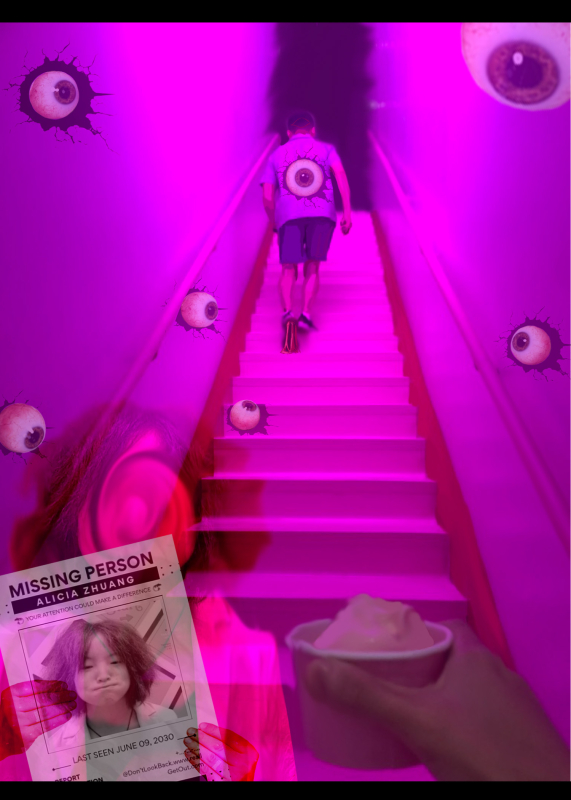
For Part 1, I used a photo from the Ice Cream Museum in San Francisco. At first, I added too many elements like a wanted poster, eyes, and text, which made the image feel messy. I changed direction and created a darker, Backrooms-style scene with a shadowy exit, watching eyes, a ghost version of myself, and a missing person poster. The image became a story about someone searching for a missing person, not realizing they are trapped.
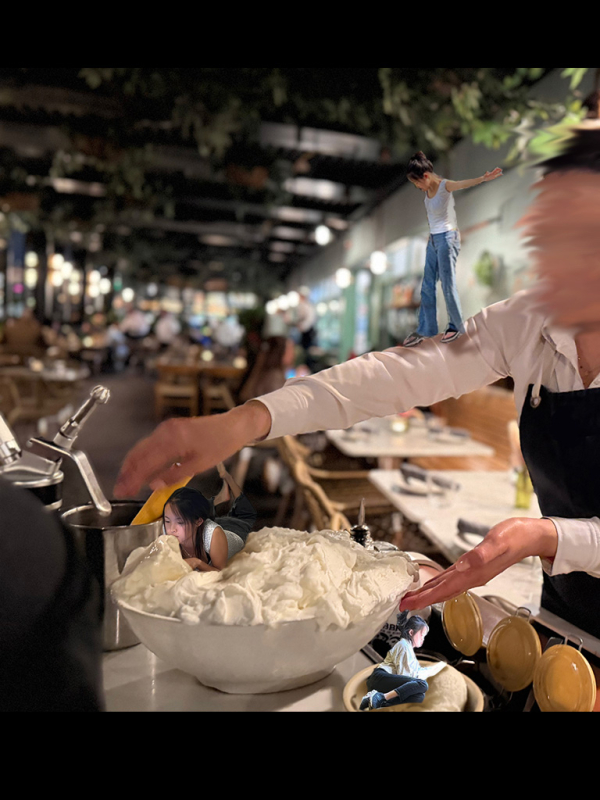
For Part 2, I used a photo from a restaurant and added mini versions of myself into the scene. At first, they looked fake because they didn’t match the lighting. I improved this by adding shadows and using blending modes like Multiply, Lighten, Darken, and Overlay to make them feel more realistic and connected to the environment.
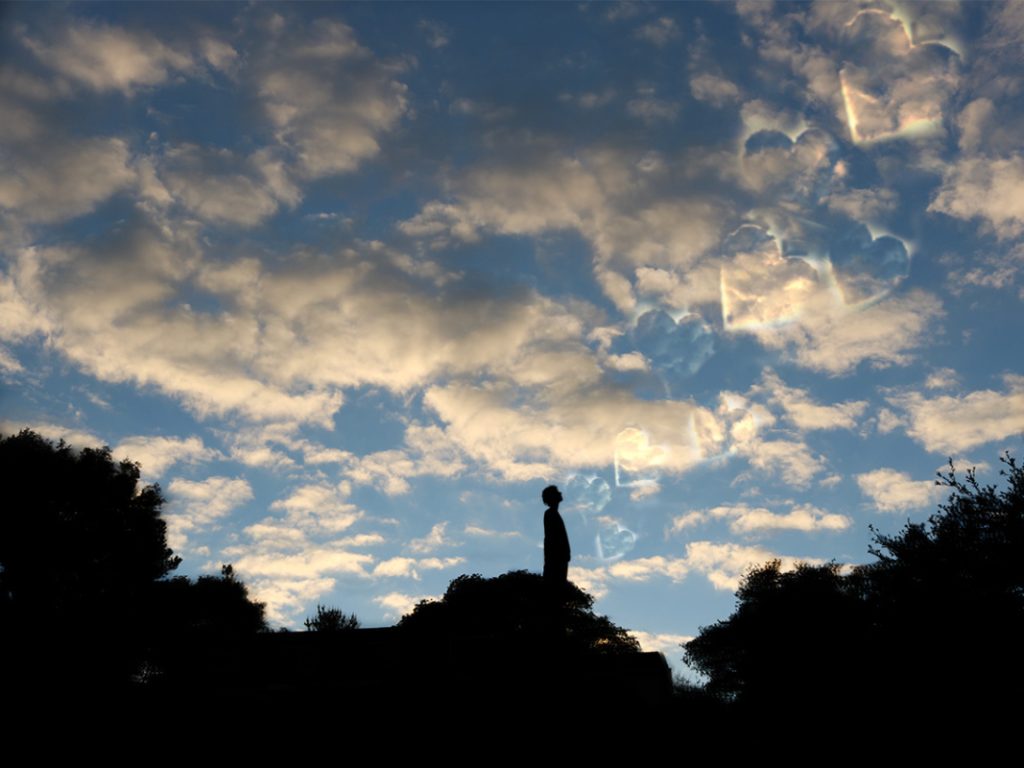
For Part 3, I used a photo from outside my house and turned the chimney area into a shadow of myself looking at the sky. I wanted to show a feeling of admiration or love, but the hearts I added at first looked too obvious. I kept simplifying them until they became subtle, almost hidden shapes in the clouds.
What I Learned
I learned that surreal art is not just about adding random elements. It’s about making intentional choices. Sometimes removing details makes the image stronger. I also learned that shadows, lighting, color, and blending modes are what make an image feel believable, even when it’s unrealistic.
This project helped me see Photoshop as a storytelling tool. I learned how to turn normal photos into surreal images that feel strange, emotional, and connected to real memories.
Process
Reflection
For this creative project, I valued the chance to make something personal and creative. I liked being able to experiment with my own photos and turn them into scenes that felt strange, emotional, and connected to real memories.
This project helped me grow as a digital artist because I became more confident using Photoshop. I improved my skills with layers, shadows, blending modes, color, and composition. I also learned that surreal art should not just look random. It should have a mood, story, or feeling behind it.
POETRY PROJECT
For the poetry part of Explorations, we wrote our own poems and turned them into videos. A Poet-in-Residence helped us learn that poems can be personal without using complicated words. I learned that simple lines can still show strong emotions if they feel specific and real.
My poem is called “Hate You Too Much, Until I Don’t.” I wrote it about the confusing feeling of trying to move on from someone. The poem shows anger, sadness, and attachment at the same time. I used short lines because I wanted it to sound like quick thoughts that come up when you are hurt.
Hate you too much, Until I don’t
I can’t know you,
cuz I don’t want to.
Everything you did,
was to harm me.
Whatever you wanted,
I wanted – for you.
Just to be happy with you.
Something went wrong between us,
And somehow i blame you,
I blame you for how my heart longs for you.
I don’t know how to forget you,
but I need to.
Cuz every day after this,
will be a good day.
“I never loved you”,
you said.
“I never needed you”,
I said.
I’ll forgive you if you go.
I’ll forget you if you leave me alone.
I’ll live my life when you’re gone.
I’ll survive when you’re no longer the place I want to go to,
the place I keep holding on.
My poetry video helped show the mood of my poem through dark colors, slow movement, and emotional visuals. Instead of showing every line literally, I focused on creating the feeling of being hurt and slowly trying to let go.
I valued the creative freedom to make the video feel personal and not too obvious. I chose simple visuals and slower pacing because they matched the serious tone of the poem. These choices helped the production feel connected to the poem without repeating the exact same ideas in a visual way.
MAKING A BETTER EXPLORATIONS PROJECT NOW!!! 🙂 ON “Better explorations” PAGE!!! –>