Reflections
Introduction
Our first project of our senior year was the Reflections project. For this project we were challenged to answer the question of “Who am I?”. We try to describe who we are by showing our interests and things that make us happy through our art and through other peoples art.
Art Curation for Personal Museum
To start off every year after the first few days of school we go on a field trip to SFMOMA. Last year our task for English at SFMOMA was to take a photo of one piece of artwork that gave us awe and in a google doc we would explain why it gave us awe. Then in Digital Media we created a video using the photo and explanation. For this years task at SFMOMA we had to take photos of artwork that we would or wouldn’t put in our own Personal Museum and explain why in a google doc.
3 art pieces I would ADD
to my Personal Museum


2 art pieces I would
EXCLUDE from my Personal Museum


My own work as an artist and my own criticism of my artwork influenced my choices on which pieces made my personal museum and which ones didn’t because I like things that are colorful and things that are pretty and cool to look at like a picture that I got that shows all of the different rides at Disney or a painting of Seattle hung up above the fireplace at my house. But I don’t like things that are not very colorful or have a weird look to them.
My Personal Mandalas
The first project for our Senior year in Digital Media was our Personal Mandala projects. Our mandalas had to answer the question of “Who am I?”, which means that we had to try and think about what makes us who we are, like what we like to do or what things are we most passionate about.
My mandala was inspired by my obsession for sanrio/hello kitty, pokemon, and pusheen themed stuff as well as my favorite fruit which is strawberries. I used Adobe Illustrator to create my mandala. I often used the technique of locking my layers and turning off the eyeball on the layers that I’m not using so that I don’t mess with my artwork on the other layers. At first I was thinking about doing my mandala on things that I like to do like drawing, painting and crafting but I couldn’t figure out how to illustrate them in my mandala. This piece includes my love for sanrio and pokemon as represented by the hello kitty on the second petal and the pichu and poke ball on the last petals. Using the tablets and pressure sensitive digital brushes was tough because it was hard for me to control where I wanted the cursor to be so instead of using the tablets I just used my mouse to draw everything. Before this project, my technical and artistic skills were a little foggy because I haven’t used Adobe Illustrator in a while and after this project, my technical and artistic skills started to come back to me. Overall I’m very proud of how my mandala turned out and I think that the best part of it is all the different patterns inside of the flower petals.
If the images do not display below,
On a Mac, press Command + (plus) then press press Command – (minus)
On a PC, press the Ctrl + (plus) then press the Ctrl – (minus)


My initial reactions to seeing the final laser engraved mandala on acrylic included how it looked while on the light stand. When I compare my digital BW mandala and my physical laser engraved mandala, I can see how my artwork comes to life when it’s sitting in a dark room with the light stand on. My choice of acrylic for my laser engraved mandala best represented me because It’s see through which is how I feel sometimes when im with a group of friends or when im in class sometimes I feel like no one can see me especially because im a very shy person and I’m not very talkative around others.


For my colored mandala I chose to use the same mandala that I created for my BW mandala. This piece is different from my BW Mandala because this time it’s filled with colors instead of all the shapes being blank. My initial reactions to seeing my printed colored mandala included me being proud and happy with how it turned out. The color scheme in my piece represents my favorite colors which are pink, blue, and purple. I added green to the last flower because I thought that it would go well with the other colors. I wanted all the flower petal colors to be light shades of blue, pink, purple, and green. Then I wanted to change all the black strokes to a darker shade of blue, pink, purple, and green. Working with only black strokes made my mandala look very plain but adding color made all the different parts of my mandala stand out more. I surprised myself with how well the flowers were expressed by adding colors inside them and changing the colors of the strokes to be darker than the colors of the petals. Through this project, I can apply color to something that looks boring at first and make it look more interesting to look at. Other reflections about my colored mandala include that if I had a little more time I would have tried to create a different mandala and that I could’ve added gradient to some of the flower pedals.
After I finished both the BW and Colored Mandalas I had to choose one of them to use for my Mandala Build Reveal videos. In the Build Reveal videos we had to show how our Mandalas were made by screen recording ourselves turning on the eyeballs on each of the individual brush stroke layers in Adobe Illustrator. Then in After Effects I edited it by adding a colored background behind the screen recording, adding music in the background, and adding text in the beginning of the video. Once I finished I put it in Mr. Flo’s dropbox so that he can put it up on the freestyle website and also on the freestyle youtube channel.
My reflection about the entire mandala project from creating mandala templates, BW mandala with pressure sensitive brushes, colored mandala, build reveal video, and final laser engraved mandala include it being really fun and I enjoyed the process of creating my mandala in Adobe Illustrator. What I’m most proud of with this project is my design and how it turned out when I saw it engraved on the acrylic. Through this project, I learned how to use a clipping mask to make my brush strokes go all around the artboard in a circle so that I didn’t have to draw the same stroke repeatedly in a circle. This project changed the way that I value others’ art by helping me understand who they are and it helps me see what their interests or hobbies are.
Design
In Design, we started the year off with the Surreal Summer Collage project. For this project we had to create a collage in Adobe Photoshop with photos that represent what we did over the summer. After we finished the Photoshop version we moved on to Adobe Illustrator to make two other versions (similar to the Photoshop one) which later on we put them all together on a black background to create a triptych.

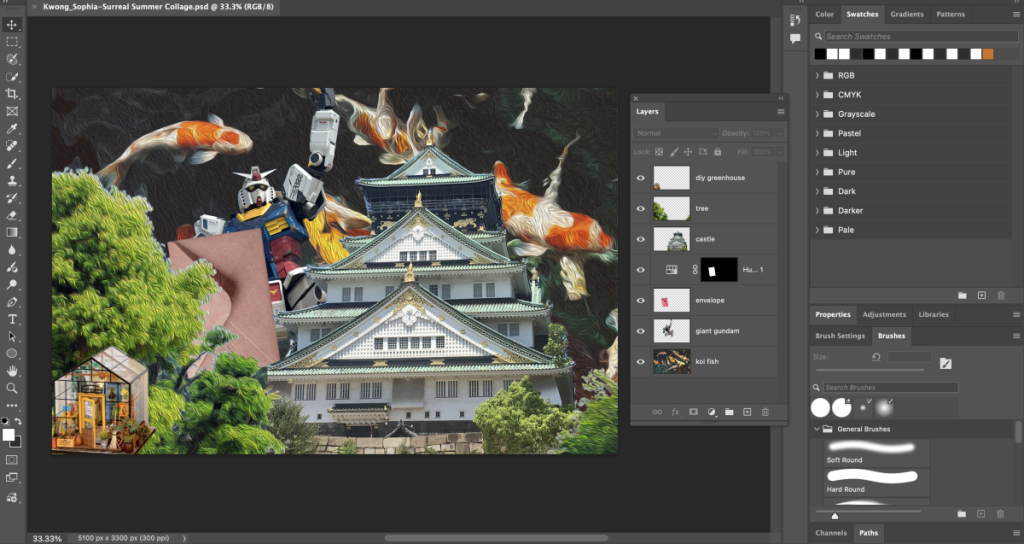
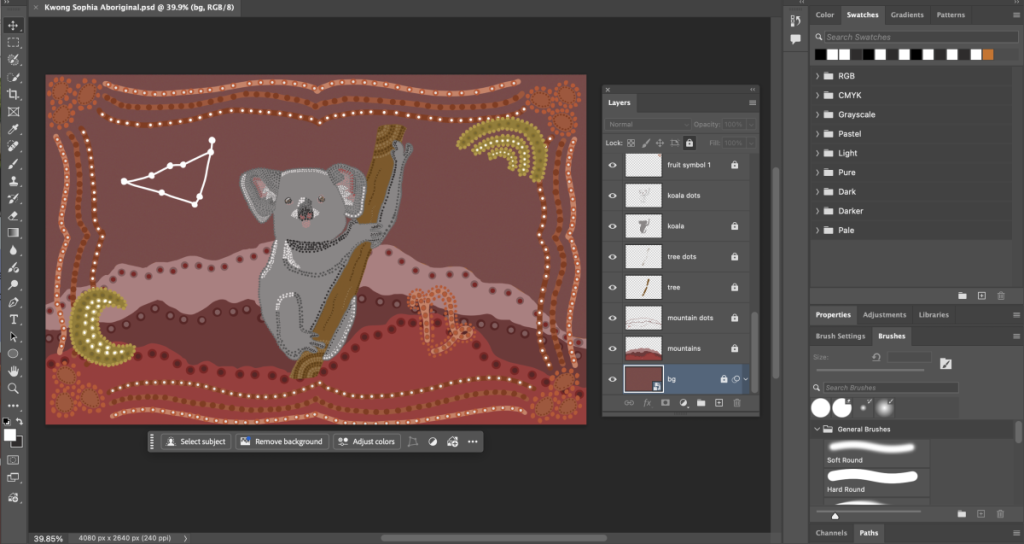
Right after finishing the our Surreal Summer Collages we started planning out what we wanted to do for our next project which was the Aboriginal Art Project. For this project we had to first find out what our spirit animal is, what colors we would use, and what aboriginal symbols we would use in our artwork. Then we had to sketch/plan out how we wanted it to look like so that we have something to work with instead sitting at our desks and blanking out for a long time. After we finished the planning part we started drawing it in Adobe Photoshop using the brush tool.

Artist Statement
Before we could start our Aboriginal Art Project in Photoshop we had to choose three different aboriginal symbols and a spirit animal to add to our artwork. The symbols that I chose were fruit, the moon, and a rainbow. I chose a koala as my spirit animal because koalas are very quiet, sleepy, and they don’t really interact with others a lot like me but they are also caring like me too. The fruit symbol represents my love of eating fruits like pineapples, apples, grapes, and raspberries but my favorite fruit is strawberries. The moon symbol represents me being a night owl because sometimes I stay up until twelve or one in the morning doing my homework or watching videos on my phone in bed when I should be sleeping. The rainbow symbol represents my love for rainbows because whenever I’m doodling a rainbow it is one of the first things that comes to my mind. To create my Aboriginal artwork I used the brush tool in Adobe Photoshop to draw all the different dots, shapes, and lines. I had to make many separate layers for the dots and the shapes which made it a little hard for me to remember to lock my layers because sometimes I would draw the dots on the wrong layer then I’d have to delete the dots and fix the layer that they were on. Fixing the layer that I put the mistake on took up some of my time so after making the mistake the first time I tried to do my best to remember to lock my layers and be on the correct layer that I want the dots to be on.
After the Aboriginal Art, we moved on to our Concert Posters which is a new project that Ms P. created for the seniors this year. For the Concert Posters we had to figure out what music genre we wanted to do and find a band or artist that played that type music during the years before 2010. We also had to research a little bit about the genres we chose and about the bands or artists. While researching the genre and band we had to find concert posters that we could use to put on our moodboard as inspiration for our Concert posters.

Artist Statement
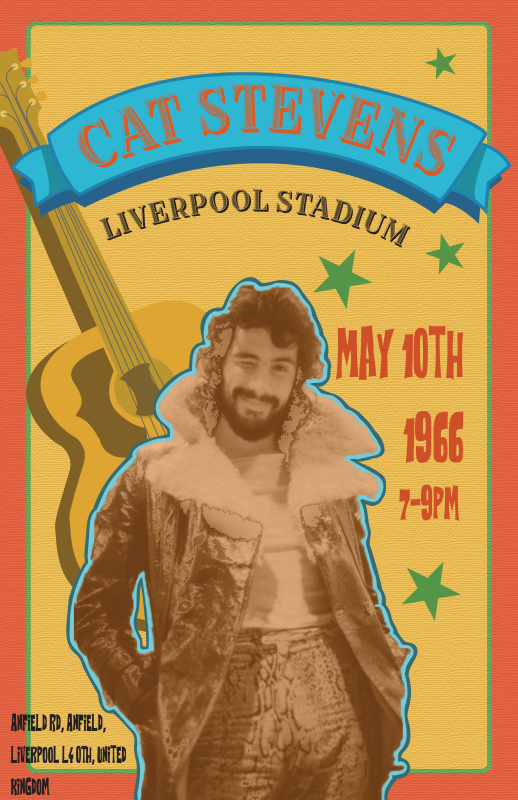
For my Concert Poster I chose to design it for a musician who was popular in the 1960s-1970s and went by the name of Cat Stevens. In the 1960s- 1970s people were being involved in cultural and political activism, there was some new music being introduced like folk rock and psychedelia, and their fashion was being influenced by the new music. There were also new technologies being introduced like the TV and people were enjoying activities like camping or fishing. The genre of music that I chose for my concert poster was folk and the sub genre I chose was folk rock. Folk music is an oral tradition that is passed down to many generations. Folk rock is a mix of rock music and has a heavy influence of pop. Folk rock became popular in the United States, Canada, and the United Kingdom during the mid-1960s. To create my concert poster I started by using the shape tool in Adobe Illustrator to make a big colored rectangle to cover the background. Then I added an edited photo of Cat Stevens on top of the background color. After I used the pen tool to draw a banner to put my musicians name over and draw a guitar to put behind the image of Cat Stevens so that when someone looks at it they know what instrument is going to be used at the concert. Finally I used the text tool to add my musicians name and the location, date, time that the concert would take place. Something that I learned from this process was that you can texture the background of something so that it makes it look less flat. Something I would change would be to maybe add a gradient to some of the text or maybe put something in the corners of the poster.
What I value in my Design productions is that in the future I would be able to help design posters for school events or for events outside of school and I can use my art to express my interests and help people learn more about me.