My 3D Character – Kiigo!
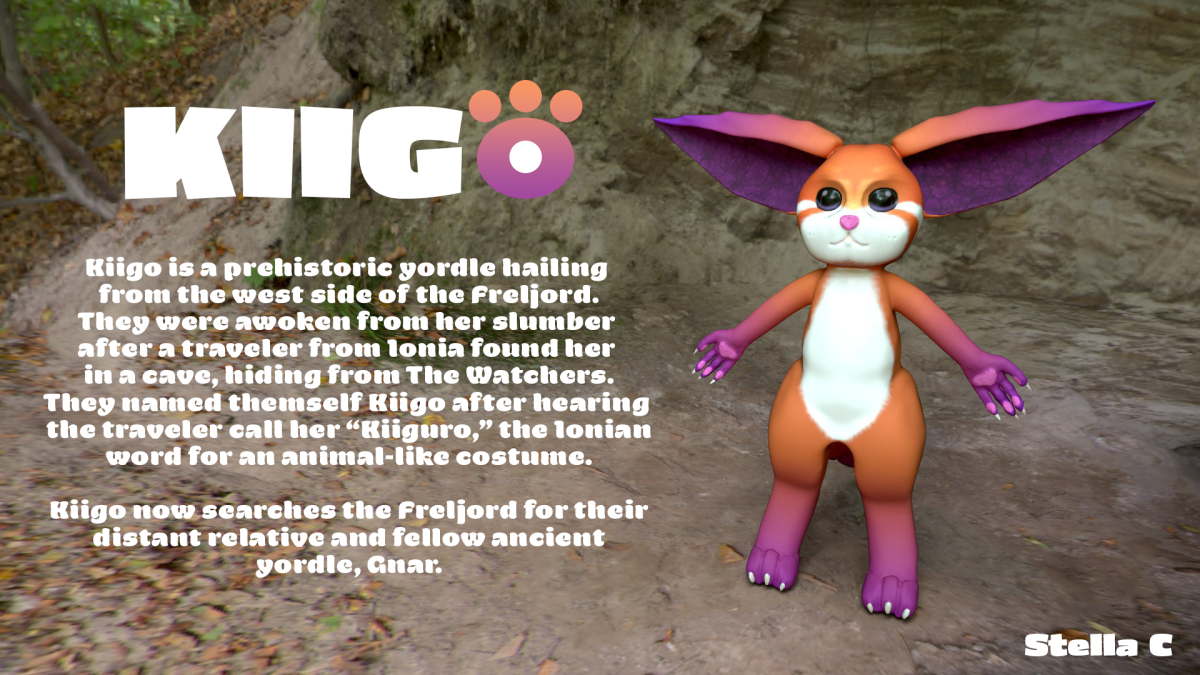
Animating Kiigo
With Kiigo’s model finished, I rigged their mesh with bones, controls, and got to animating. Using the keyframe editor window in Maya, I animated them walking, running, and jumping.
Frankly, I think I could’ve done a better job, especially with the walking animation. Additionally, I tried to rig their tail and ears, but Maya’s HumanIK rigging system really didn’t want to cooperate, so unfortunately no dynamic tail or ears 🙁
Kiigo Talks!
Next up on the menu, making Kiigo talk. In order to do this, I had to go back to Kiigo’s base mesh, using the sculpting tools to move their facial vertexes into various mouth shapes. Then, after I had enough mouth types, I merged all meshes into a set of blend shapes. In addition, I re-rigged Kiigo in order to give them head and arm motion. This time, I used a Delta Mush deformer to get Kiigo’s mesh to deform in a softer and more natural way.
The audio I chose is the “you better not mess with my gang” audio, which comes from a series of TikToks in which people post silly images of their cats. I had a real blast having Kiigo lip-sync along to a goofy meme.
Narrative Animation
Oh boy, the Narrative animation. Where do I even begin. Now look, before I say anything, I just want to make it clear that I had a blast working on this project, but gosh it had some REALLY frustrating moments.
My main job for the narrative animation was to texture and light the scene. Sounds simple, but it took a LONG time. I spent hours in Hypershade, Maya’s node-based material editor, applying different maps to building and object surfaces. One thing that made it especially hard to texture was that I often had to manually assemble the UV maps (flat surface projections for applying textures) for many of the buildings in the scene, and it was SO much troubleshooting.
Reflection
The second Narrative unit in Animation was, in my opinion, just as fun as the first. 3D animation, much like 2D animation last year, was a mostly unexplored realm for me, and I learned quite a bit about how various systems in 3D work. I had fun working on my own animation, and working with a group– and while there were certainly times when I wanted to storm over to Autodesk headquarters and give them an earful, I came to appreciate the relatively streamlined animation process that Maya has. It was a real joy to be able to bring Kiigo to life!