

Introduction
The visual narrative unit is all about storytelling. It challenges students to write, and record a short story that shows the development of a character and describes the scene. The Narrative unit kicks off in english with students reading and watching example short stories to get a handle on what they look like and how they’re written. In Digital Media, students learn how to use things like Wacom Digital Drawing Pads and Adobe Illustrator to create the covers of their short story albums. Students will also add onto their knowledge of Avid Pro Tools and also learn how to layer and add SFX to their recording to deepen the listener experience.
One of the things that i valued from the visual narrative unit was the creative freedom. In Animation, we got to create an animated short story. I really enjoyed this because. I got to design the character that we were using. I also got to refine my character animation and design skills. What I Valued from my digital media class was learning how to use Avid Pro Tools to create my voice over for my story. I also sort of enjoyed the process of finding the perfect SFX for my short story to immerse the audience into my story. Lastly, what I valued from my english class was learning how to develop characters more and how to set scenes. I also enjoyed getting constructive criticism from my peers and teacher so I could improve my writing skills.
Story

This is my initial idea of the Main character. He didn’t really change much
The image above is just a small part of what we were assigned to do in our English class. We were instructed to create a character and compelling story to put that character into. While the initial part of learning what a short story was was kind of boring for me, once we got to start writing about our characters, I took off. This was one of my favorite units in English because I got to write a fun story. The inspiration for the world that my story was set in was from a book series called The August Few (a bit of an odd book, but pretty entertaining). The society within the book is based on a kill or be killed system. Basically just survival of the fittest. The aspect of this book series that I put into my short story was that kill or be killed part. The threat of being eaten by those around you. Also, I intended my character to not be human. This world is devoid of Humans and is filled with creatures. Juniper is one of those creatures. However, its up to the listeners interpretation to what kind of creature he is.
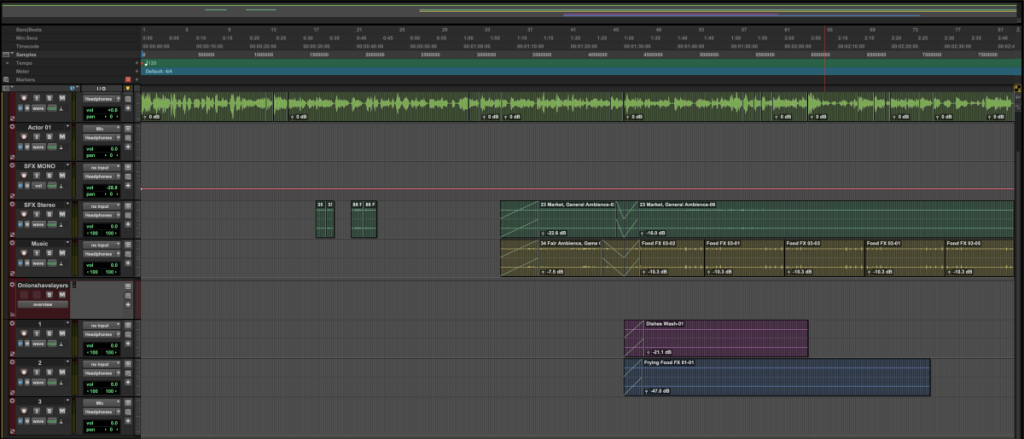
When it came to the recording and SFX of my story, it wasn’t too bad. the hardest part of the recording was getting a clean recording where i didn’t stutter or skip a few lines of text. Now, the hardest part about the SFX was just finding the right ones. We were basically given a bunch of files, full of different SFX. While its good because it has variety, because it had such a large catalogue, it made it difficult to find the SFX i wanted. So the sounds that were playing while juniper was in the food section of the market were actually just a couple of different specific SFX for cooking(general cutting, frying, boiling…).
Honestly, this unit was really fun for me. Like I said earlier, just being able to be creative and write about something that I made was really fun. It’s a nice break from the english classes that I’ve been taking for most of my life where we just write about other people and mostly boring topics. This unit was honestly a nice breath of fresh air. The other parts of the unit were fine though. Like the audio recording and SFX hunt were kind of fun; needing to essentially stitch my own SFX together to create the right scene in peoples minds.
It Was Worth It
Note to reader:
italics are for internal monologue
>It was worth it<
Juniper woke up to his brother violently shaking him. He quickly rose from his sleeping bag and grabbed his brother by the shoulders. “What?! What happened?!” he exclaimed. “I’m Hungry,” his brother said.”… Are you serious?” he grumbled. He rubbed his face and growled “Why didn’t you eat more food last night?”. ”I wasn’t hungry!” his brother argued. Juniper stood up and stretched his stiff limbs, the cold alleyway air blowing on his bare face. He walked over to a big box laying on the ground. He looked around to check and see if anyone was hiding in the shadows. After deducing that it was safe, he dragged the box behind the dumpster where they were sleeping; rolled up his sleeping bag and shoved it under the box. He then signaled to his brother to come over. “I’m gonna go look for some food. Stay here”. His brother nodded and got under the box. “Remember, if anything happens, you know what to do,” he said before handing him a small pocket knife. He took one more look into the alley to check if someone had appeared… no one. He quietly slinked out of the alleyway and into the main streets of the city.
He could hear the chatter from the market from down the street. He flipped up his hood and proceeded on into the bustling market. He recoiled from the overwhelming scent of perfumes and covered his nose with his jacket. After passing those godforsaken perfume stands with their bright colors and loud advertisers who wouldn’t stop getting in your face. Juniper hid behind a taller deer-like monster to avoid the unwanted interaction. He proceeded to the food section of the market. Unlike the perfume stands, the food stands followed a color pallet. Reds, golds, whites, browns… colors that would make one feel safe and cozy. However, the foods section of the market wasn’t like that. Under the warm colors and nice smells, it was a dangerous place. If you didn’t keep your guard up or if you got too close to the dark zones… lets just say you would end up at the meat stands on display for purchase. Juniper continued to cautiously go around, looking for people to either pickpocket from or food stands to steal from. A rather large ice monster passed by him. Confident struts, head held high, doesn’t look like he’s from round here.“Hm…you’ll do”. Juniper snaked through the crowd to catch up with the monster. And started looking for where he held his gold. Found you. He reached for a small pouch that the monster held on his hip and swiftly switched out the monster’s pouch for a pouch of small, smooth, coin-shaped rocks. The monster suddenly turned around- but Juniper was already gone. He checked to see his earnings from the mini heist… “A hundred eighty two?!?!” he mouthed. He quickly put away the gold into the inner pocket of his jacket and started to look for some food to purchase.
Behind the scenes

Ending Q & A
Q – How did I grow artistically and technically with this project? What did you learn or confirm about yourself and your technical and artistic skills?
A – Artistic wise, I think that I improved on my descriptiveness of locations(like the look and feel of a place), and Tech wise, I expanded my knowledge on pro tools and how it works. I learned how to produce and edit a voiceover.
Q – What struggles did I encounter and how did I overcome them? Please do NOT tell us about your inability to manage your time or that you procrastinate too much – not interesting.
A – I think the only thing i struggled with was finding the right SFX for certain scenes. it was a bit difficult to find a file that sounded like a restaurant kitchen.
Q – What would I change? How would I change it?
A – I think that I would clean up my voice recording a bit. As in, not trying to drop the pitch of my voice to sound more serious.
Q – What am I most proud of with this project?
A – The quality of my writing. I initially thought that it sucked, but the feedback I got was positive and actually asked for more scene descriptions
Q – How will I use the ideas I learned on this project in future projects or in other areas of my education or life?
A – If I ever need to edit a voiceover, I now know how
Q – How did this project change the way I see / appreciate / value others’ audio productions?
A – I now know the struggle of getting a perfect voice recording.
Illustrations
Im still trying to come up with cool graphics to add to my website so stay tuned •⩊•
Exquisite Corpse

For this project, we were given a 500×500 pixel box to create a design in. The design had to also connect to a certain point in the box. For maximum chaos, we weren’t allowed to communicate with our group members about the design we were making. we just had to come up with something and hope that it looked good. I went with a neutral choice for my design and just put a loooong cat.
Illustrator Project Choice

*To View Original Piece, Please Click The Image Above*
Above is the design I created.

This is what my Adobe Illustrator interface looked like while I was creating my design.

Above is the final product. sadly, the black dog’s head didn’t align right with its body.
Artist statement
For this project, I created a design to go onto a pint glass. To plan for the design, I sketched a few ideas on paper before settling on 2 canines chasing each other. After I finalized this design, I took a picture of it and put it into Adobe Illustrator to do the line art. After doing the line art, I sent the design to my digital media teacher who then used a cold engraving machine to put my design onto a pint glass. My inspiration for this piece was a dragon biting its tail or ouroboros. Ouroboros is meant to symbolize an everlasting cycle of life, death, and rebirth. When I was designing this piece, I remembered a cool bit of artwork done by one of the artists that I follow online(I can’t remember their name). They created an art piece of a rabbit and wolf in a chase. The wolf bites the rabbit, the rabbit bites the wolf. An eternal cycle of violence. The artwork that I made wasn’t created to send a message of an eternal cycle. Infact, I made the art piece look like that because I thought it would look cool. However, if I had to put a message on it, it would simply be: “The eternal chase to kill. Everlasting violence without reason.” The only thing I would ever change on this piece would be the alignment. To change this, I would just measure the overlap on the top of the glass and subtract it from the design.
I think I grew more technically than artistically with this project. I learned how to work with Adobe Illustrator more and learned how to fix minor problems like fixing how colors filled a certain space.
I think the thing that I’m most proud of with this piece is just how it came out. Even though it wasn’t perfect, It still came out better than I thought it would. Now that I know how to use Adobe Illustrator, I can create simple and resizable designs without needing to redraw them. It surprised me that a lot of the detailed artwork around our Digital Media classroom was created in Adobe Illustrator.
Reflection
To be honest, I didn’t really like using Adobe Illustrator. While it has its uses like making customizable and simple graphics that can be easily resized because of how Illustrator processes things, its not the best when it comes to creating drawings. I feel like Photoshop would be better suited for drawings. However, like I said, when it comes to resizing things, Illustrator takes the cake. I have never seen any drawing software that can resize an image and keep its quality. That’s when Adobe Illustrator is superior since it processes things as math equations. However, this is about where I feel that Illustrator falls off. Simple things that are a piece of cake for Photoshop or any other drawing software are almost impossible to do easily in Illustrator. For example, filling in a complex design. While for things like Photoshop, you can just use the paint bucket tool and bam, you have an area thats filled in with the color that you want. Meanwhile with Illustrator, you need to go through the process of cutting out your design, separating all the lines that aren’t directly contacting the outside of your design and then linking them together. While this can be easy for a simple or small design, its absolutely horrendous process when the design becomes complex. If you don’t go through the process of breaking then connecting the outer lines of your project, you end up with your chosen fill color barely filling in the area that you wanted it to.
Animation
About
Here at freestyle, each student gets to pick 1 of 3 electives: Film, Design, And Animation. I went with animation. In animation class, we learn the basics of animation like how to animate walk cycles and how to make things entertaining to watch by doing things like stretch & squish for exaggeration, Follow through for things that flow like capes and hair, and also how to show fast movement through drawing exaggerated lines. There are other things that we learn about, but these were some of the things that I could think of off the top of my head. After were shown how to do these things, the rest is for us to find out. Trial and error. I think its so people can find what works best for them. Anyway, animation is a fun class with nice people and a cool teacher who has prior experience in the industry.
Most of the things in this class are quite difficult and time consuming to produce. Honestly, the hardest thing in this class is just trying to time manage. As an example, we just had a project where we needed to produce a 1 minute long animation. Now, while 1 minute doesn’t seem like much to people who don’t do animation, 1 minute of animation is a ton of work for a newer animator. During this project, we had to make a storyboard for our animation(a storyboard is basically an outline of what were going to animate). Little did I know at the time, this would take up most of my animation time. I had to cram and ended up producing an animation that was below my personal standard. Now I know for the future that I should probably skip the storyboarding and jump to animating.
Character walk

This is Winston. Winston was created by me while I was doing some homework. I drew a triangle and then gave it eyes and neck… and then ears…and then fur. and that’s how Winston was created. Now, you might be wondering “what is that abomination on the right?” That’s live action Winston. We needed to create a physical version of our characters. I thought that Winston was going to be easy to recreate. He wasn’t. He looks absolutely wonky. He gets to go on the disappointments shelf. He was supposed to have a jacket, but I was told he looked better without it.
Yeah, he moves now. It was kind of hard to animate his physical body because of how his legs are. The process of making this video was kind of easy…with the exception of Winston’s physical form. the 2D animation was pretty simple, just an easy walk cycle. The editing of the video was also kind of easy; all I needed to do was just put the videos of both Winston’s walking and reflect and darken their bodies for the shadow. The background image of a backstage. Now, animating the 3D Winston was quite annoying. Due to how I decided to make his legs look, it was difficult to make his walk feel somewhat natural. Plus, the greenscreen we were using reflected onto him and gave him a green tint. One of his arms also broke while I was animating.

This Is basically what I was looking at while I was animating Winston in 2D. There isn’t really too much to this screenshot. On the right is his character reference. All the little blue rectangles are the animation frames that i drew. to transfer this to Adobe Aftereffects, I just switched out the background with a green background. I put some detail of his fur and tail bouncing.
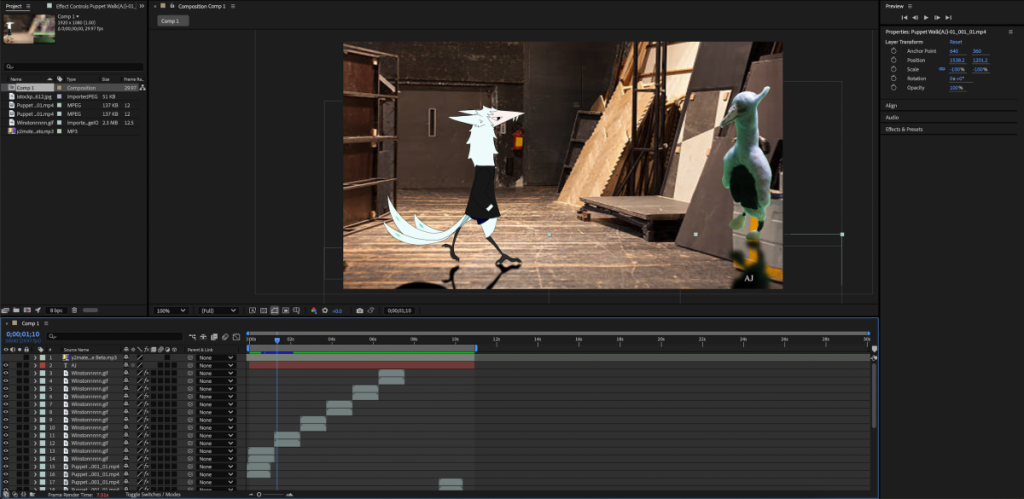
This is where I put together the 2 animated Winstons. To create the video, I basically had a video of Winston taking 2 steps and looped it. The shadows under him are just a reflected image thats been desaturated and darkened then blurred slightly.
Lip Sync
This project was kind of fun for me. For this project, we basically just had to find a song or voice line that we liked and animate to it. I chose Steve Lacy’s Dark red. I really like the song because its just chill and cool. The character in the animation was just a random character that I thought of making. The lip syncing part was kind of tedious to do since I was basically copying and pasting mouth shapes to line up with the song; needing to get the timing right and such. Looking back on this project, I think I should have brought his shoulders closer together and his face a little lower.

This is where I made all the facial movements and character design for this project. The reason all the mouth shapes(all the layers in the Speaking group) are on different layers is because it was both easier and faster to make each of the mouth movements into images instead of animating them all separately.
Also, the character isn’t based off of anything. I just made him for this project. He was also initially going to be wearing a red jacket. I decided to remove it because i couldn’t decide how I wanted it to look.

while it doesn’t look like much is happening here, every one of those layers are mouth and eye movements. I had to manually copy and paste each of those layers and then sync them with their respective line. It took a while, but I eventually got it done.