The Animation Narrative Project teaches students how to use custom character models in various forms of keyframe animation, including walk cycles, run cycles, jumps, lip syncs, and collaborative narrative animations. This involves learning technical skills in Autodesk Maya, particularly regarding how to properly import, rig, and keyframe character models.
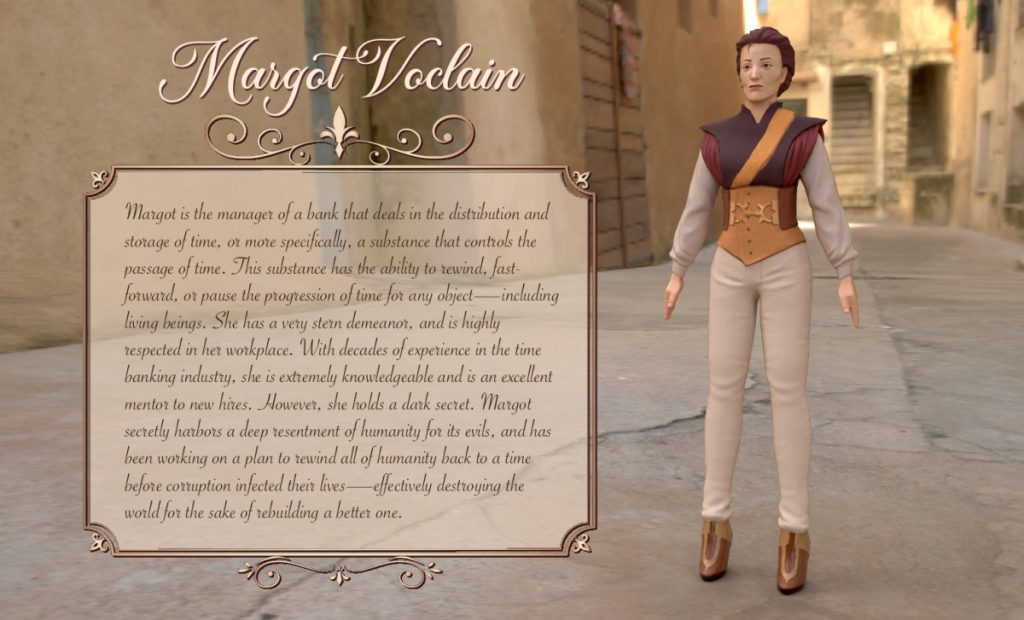
3D Character Bio
The 3D character bio serves not only as a showcase of the custom 3D character model I created this year, but also as a narrative piece that briefly explores the character’s identity, background, and motivations.
Walk, Run, and Jump Animations
The first animation exercise we completed with our character models was a set of simple run, walk, and jump cycles. Using Autodesk Maya and its keyframing features, we animated one cycle of each movement. We then duplicated these cycles in After Effects to create 3 short animation loops, which can be viewed below.
Lip Sync Animation
The Lip Sync Animation Project taught students how to use Maya’s “Blend Shape” feature. Through the process of cutting a mouth hole into my character model, duplicating this edited model, transforming the mesh around the mouth to create specific shapes on each duplicate, and using the Blend Shape tool to link these models together, I was able to keyframe mouth movement on my 3D character model. I then imported an audio of my choice into Maya and lip synced my character to the words, resulting in the final product below.
3D Narrative Animatic
The 3D Narrative Animatic was an important step in the process of creating our 3D Narrative Animation. At the beginning of this collaborative project, my group created a storyboard for our animation together. This storyboard was then refined, and our group member Jaidyn made it into the animatic below while Kingston and I began pre-production of the animation. Thank you Jaidyn!
The purpose of an animatic is to have a moderately detailed plan of what our shots will look like, which serves as a useful reference when we’re animating the final product.
3D Narrative Animation
The 3D Narrative Animation challenged students to collaborate on a short animated story of their own creation, finding creative ways to integrate each student’s unique character into the same narrative. My group’s three character models included a monster, a cowboy, and a fancy lady, which we decided to use in a story where the fancy lady forces the monster and cowboy to learn some manners. While we tried to incorporate some motion capture into our animation, we ultimately cut it from our final product because the clips were too short and looked too messy. This means that the final product of our animation was entirely keyframed by hand, which allowed us to make our shots look exactly how we wanted. All 3D assets besides the character models were found online, but were significantly edited to fit our custom vision. The final animation can be viewed below!
Written Reflection
I really valued being able to learn how to use high-end 3D programs in Animation this year. Our assignments allowed me to practice and refine a solid foundational skill in 3D modeling, which I am very excited to continue developing, especially due to its relevance in my future path of study in concept art. I’m proud to now have a sense of familiarity with programs as intimidating as Maya and ZBrush, and I feel empowered to use these skills to broaden my horizons as an artist.