_____________________________________________________________________
Funny Compositions
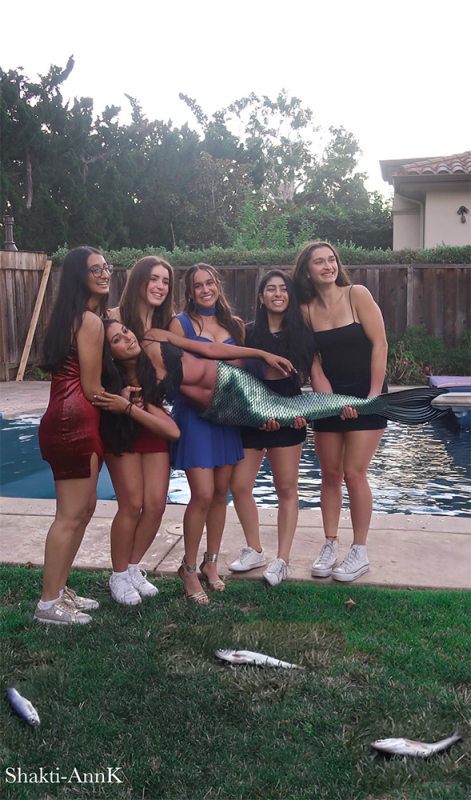
This image is humorous because it juxtaposes a familiar visual convention, holding a fish in a display of pride, with an unexpected and exaggerated substitution, replacing the fish with a human figure enhanced by a mermaid tail. The contrast between the recognizable pose and the absurd subject creates a sense of visual incongruity, which is further amplified by the surreal, mythical element. This deliberate mismatch between expectation and reality generates amusement by combining familiarity with imaginative distortion.

Behind the scenes
Behind the scenes, this image was created through digital manipulation by compositing multiple elements into a single, cohesive scene. A standard photo of a person being carried was used as the base, and editing tools were then used to add a mermaid tail onto the carried figure, carefully adjusting scale, lighting, and positioning so it appeared naturally integrated. A fish image was also placed on the ground to reinforce the visual reference to a traditional fishing photo. Through layering, masking, and color correction, the final composition blends realistic details with imaginative elements, resulting in a deliberately surreal and humorous effect.
Surrealism

This image is humorous because it combines ordinary and surreal elements in a way that disrupts expectations. The familiar, everyday action of a girl opening a refrigerator is contrasted with the unexpected presence of an unusual or nonsensical object inside, creating a sense of absurdity. This is further heightened by the inclusion of a tiger in the background, an element that is entirely out of place in a domestic setting. The humor arises from this layering of incongruous details, each individually surprising, but collectively amplifying the overall sense of unpredictability and imaginative distortion.

Behind the scenes, the image’s surreal quality is achieved through deliberate digital editing choices that alter the scene’s natural appearance. Elements such as the sky are recolored into unnatural tones, like shades of purple, to create a dreamlike atmosphere that departs from reality. Similarly, the tiger is rendered in an unexpected color, reinforcing the sense of visual distortion and unreality. These adjustments are made through techniques such as color grading, hue shifting, and selective editing, allowing each component to remain recognizable while still contributing to an overall environment that feels imaginative and intentionally artificial.
Connection to my Worldbuilding Project

The final image unifies the concept by depicting a fictional cult centered on transforming humans into animal–human hybrids. The combination of a human face with a German Shepherd suggests a ritualistic practice tied to identity and belonging, rather than random alteration. This idea connects with the earlier surreal elements, unnatural colors, and distorted scenes by framing them as part of a controlled, alternate reality shaped by the cult. Overall, the image uses visual distortion to show how plastic surgery affects the cult and transforms people into animal-humans.
Simple Motion Graphics
I created a simple motion graphics piece in Adobe After Effects as an intro birthday message for my best friend. The design features a “Happy Birthday” message with highlighted, glowing text that draws attention and adds a celebratory feel. Subtle animations, such as smooth text transitions and light motion effects, make the message more engaging while keeping the overall composition clean and easy to read. The use of glow and movement helps emphasize the message, creating a warm and visually appealing introduction.

After the intro, I included a screenshot from Adobe After Effects to highlight some of the simple motion graphics techniques I used. These included keyframing to animate the text’s position and opacity, creating smooth fade-ins and motion across the screen. I also experimented with the glow effect to emphasize certain words, adjusting intensity and timing to make the animation feel more dynamic. Additionally, I used basic easing to make the transitions appear more natural and less abrupt. This process helped me understand how small adjustments in timing and effects can significantly improve the overall quality and visual impact of a motion graphic.
Multi-Layer Stacked Wood Art


Behind the scenes, this work was developed using AI-assisted tools and Adobe Illustrator to plan and construct a 3D stacked wood design. I approached the piece layer by layer, first designing each component digitally, separating the base, midground, and top elements to simulate depth. Using Illustrator, I refined vector shapes for clean cut lines, while AI tools helped generate and iterate on textures and organic forms like leaves. Each layer was then translated into physical pieces, stacked to create dimension and shadow. Through this process, I learned how digital design can directly inform physical construction, especially in thinking about depth, spacing, and how individual layers interact visually when assembled.
The Drafting Process

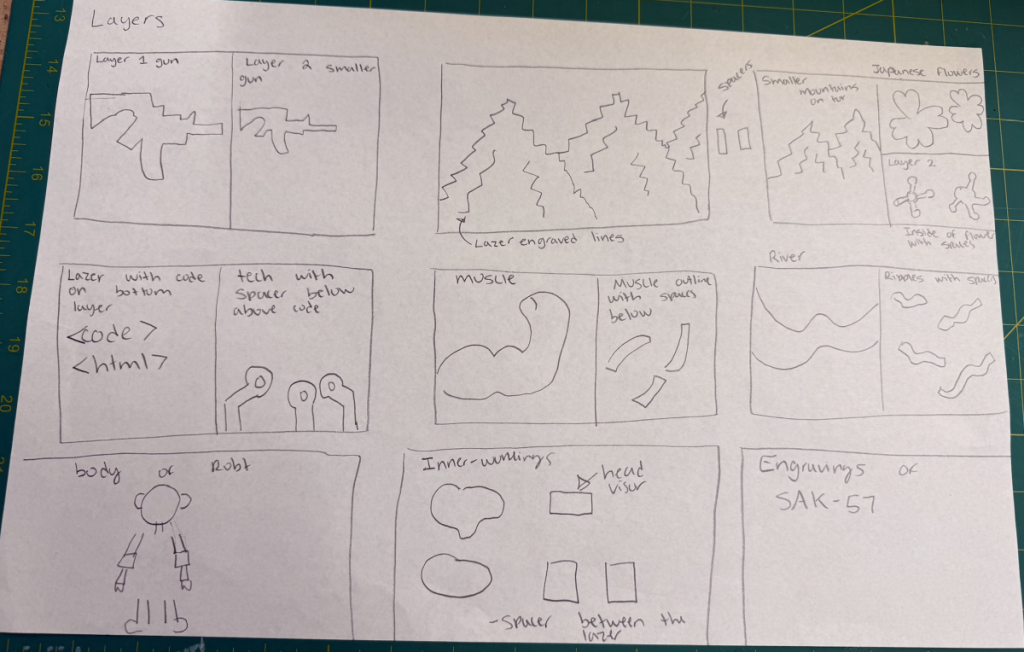
Before we started the drafting process we were tasked to sketch out a brainstrom on a piece of paper. For my original idea I wanted to combine the beauty of the Japanese countryside with the innerworkings of the cult. This used Japanesee mountains, cherry blossoms, and technology used to keep the cult isolated from civilization.
The Final Piece
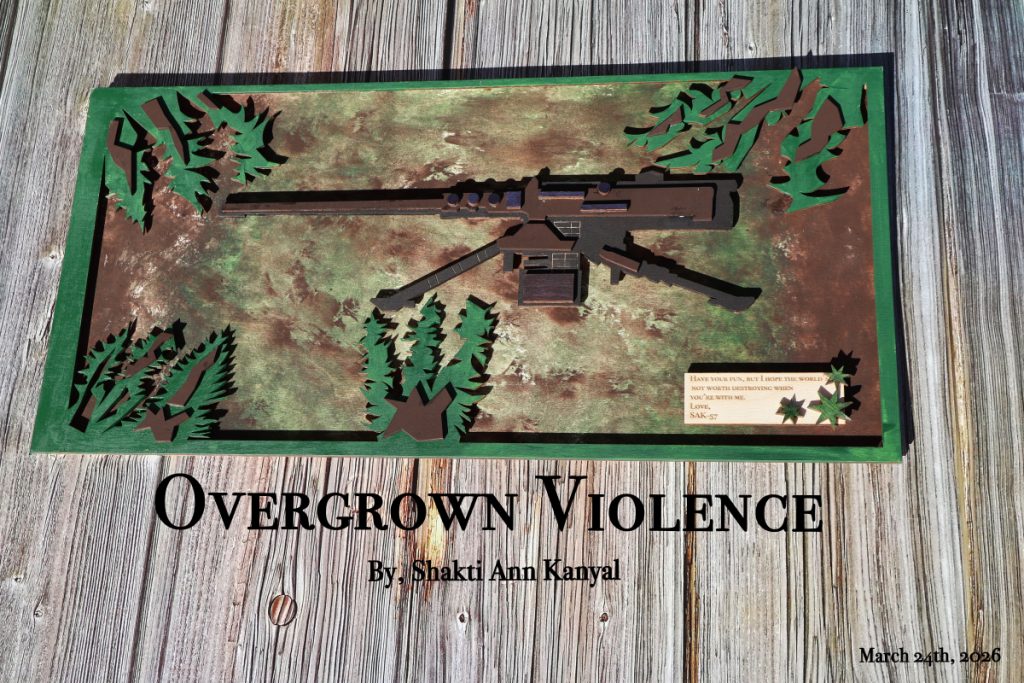
This piece, Overgrown Violence, explores the tension between destruction and nature by depicting a weapon gradually overtaken by organic growth. The layered leaves and textured background suggest that nature is reclaiming and softening something traditionally associated with harm, creating a contrast between aggression and renewal. The use of earthy greens and browns reinforces this idea, giving the composition a grounded, almost reclaimed feel, while the weapon’s structured form remains visible beneath the overgrowth.
Assembly Video
The assembly video was edited in Adobe After Effects and sped up to create a time-lapse of the building process. This makes the layering and construction more engaging and easier to follow, showing how the individual pieces come together into the final artwork. Through this, I learned how pacing and speed can enhance the clarity and visual impact of a process video.